BLN Wheel Menu - The Most Authentic Radial Menu for RedM
- Published on
- • 6 mins read•--- views
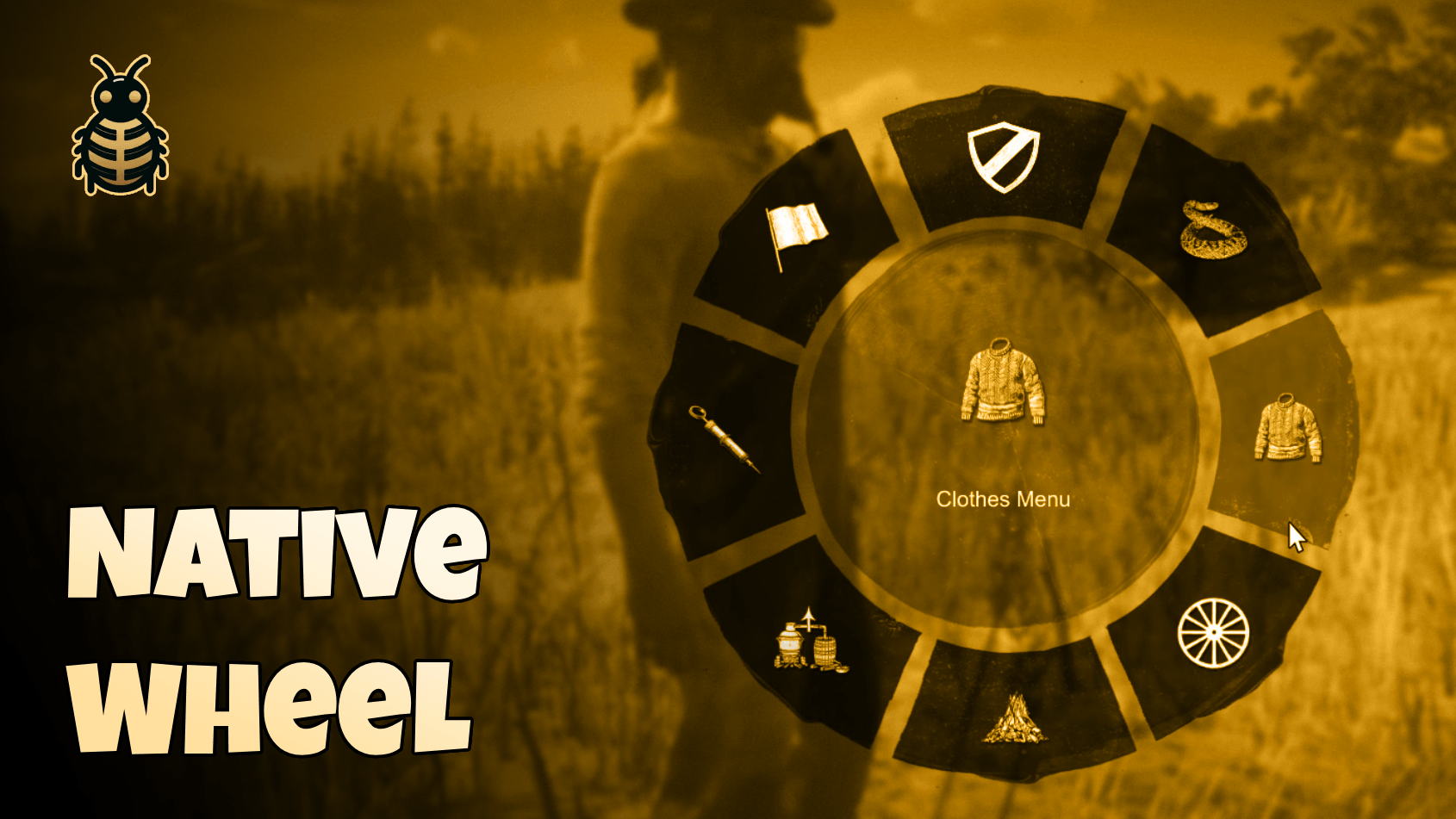
🌟 Experience the Most Authentic Wheel Menu for RedM
Introducing BLN Wheel Menu - a premium radial menu system built using native RedM functions, offering the smoothest and most authentic experience possible. Say goodbye to laggy NUI-based menus and hello to seamless, game-like interaction!
✨ Why Choose BLN Wheel Menu?
- 🚀 Native Implementation - Built using game natives for that authentic RedM feel
- ⚡ Zero NUI Impact - No performance hit from web-based interfaces
- 🎯 Pixel-Perfect Recreation - Matches the original game's wheel menu design
- 🎨 Fully Customizable - Easy to configure and adapt to your server's needs
- 🔥 Resource-Friendly - Minimal performance impact on your server
- 💫 8 Quick-Access Items - Perfect for your most essential features
📺 Preview
📋 Quick Setup
- Add to your resources folder
- Add
ensure bln_wheelto your server.cfg - Configure your menu items
- Enjoy!
⚙️ Configuration
The menu can be fully customized through the config.lua file:
Key Binding
Config = {
    toggleKey = 0x8AAA0AD4, -- LEFT ALT by default
}
Visual Settings
Config = {
    -- Background color (RGBA)
    bgColor = { r = 0, g = 0, b = 0, a = 200 },

    -- Hover color (RGB)
    hoverColor = { r = 219, g = 2, b = 2 },

    -- Text color (RGBA)
    textColor = { r = 255, g = 255, b = 255, a = 255 },

    -- Enable/Disable zoom effect
    zoomEffectEnabled = true
}
🎯 Adding Menu Items
The wheel menu supports up to 8 items for quick access to your essential features. Adding items is straightforward and requires minimal coding knowledge. Simply add your items to the config:
{
    label = "Item Name",                    -- Display name
    icon = {
        texture_dict = "texture_dictionary", -- Icon texture dictionary
        texture_name = "texture_name"        -- Icon texture name
    },
    color = { r = 255, g = 255, b = 255, a = 255 }, -- Icon color (RGBA)
    action = function()                     -- Action to execute when clicked
        -- Your code here
    end
}
💡 Example Item
{
    label = "Clothes Menu",
    icon = {
        texture_dict = "inventory_items_mp",
        texture_name = "clothing_generic_m_sweater"
    },
    color = { r = 255, g = 255, b = 255, a = 255 },
    action = function()
        exports.your_clothing_script:OpenMenu()
    end
}
🎨 Customization
Easily customize colors, key bindings, and effects through the config file:
- Toggle key
- Background color
- Hover effects
- Text appearance
- Zoom effects
🎨 Color Schemes Ready Examples
🌟 Classic Dark (Default)
Config = {
    bgColor = { r = 0, g = 0, b = 0, a = 200 },          -- Solid black with transparency
    hoverColor = { r = 219, g = 2, b = 2 },              -- Bright red
    textColor = { r = 255, g = 255, b = 255, a = 255 },  -- Pure white
}
🌅 Western Sunset
Config = {
    bgColor = { r = 139, g = 69, b = 19, a = 200 },      -- Dark brown with transparency
    hoverColor = { r = 255, g = 140, b = 0 },            -- Dark orange
    textColor = { r = 255, g = 248, b = 220, a = 255 },  -- Cornsilk white
}
🌌 Night Sky
Config = {
    bgColor = { r = 25, g = 25, b = 112, a = 200 },      -- Midnight blue
    hoverColor = { r = 138, g = 43, b = 226 },           -- Blue violet
    textColor = { r = 176, g = 196, b = 222, a = 255 },  -- Light steel blue
}
🍃 Forest Theme
Config = {
    bgColor = { r = 34, g = 56, b = 34, a = 200 },       -- Dark forest green
    hoverColor = { r = 107, g = 142, b = 35 },           -- Olive drab
    textColor = { r = 245, g = 245, b = 220, a = 255 },  -- Beige
}
🏜️ Desert Sand
Config = {
    bgColor = { r = 160, g = 82, b = 45, a = 200 },      -- Saddle brown
    hoverColor = { r = 210, g = 180, b = 140 },          -- Tan
    textColor = { r = 255, g = 235, b = 205, a = 255 },  -- Blanched almond
}
🌑 Stealth Mode
Config = {
    bgColor = { r = 47, g = 47, b = 47, a = 200 },       -- Dark gray
    hoverColor = { r = 105, g = 105, b = 105 },          -- Dim gray
    textColor = { r = 192, g = 192, b = 192, a = 255 },  -- Silver
}
💎 Royal Theme
Config = {
    bgColor = { r = 25, g = 25, b = 112, a = 200 },      -- Dark blue
    hoverColor = { r = 218, g = 165, b = 32 },           -- Goldenrod
    textColor = { r = 240, g = 230, b = 140, a = 255 },  -- Khaki
}
🔥 Ember
Config = {
    bgColor = { r = 128, g = 0, b = 0, a = 200 },        -- Maroon
    hoverColor = { r = 255, g = 140, b = 0 },            -- Dark orange
    textColor = { r = 255, g = 228, b = 196, a = 255 },  -- Bisque
}
🌊 Ocean Deep
Config = {
    bgColor = { r = 0, g = 51, b = 102, a = 200 },       -- Deep blue
    hoverColor = { r = 32, g = 178, b = 170 },           -- Light sea green
    textColor = { r = 240, g = 248, b = 255, a = 255 },  -- Alice blue
}
🍇 Purple Dusk
Config = {
    bgColor = { r = 48, g = 25, b = 52, a = 200 },       -- Dark purple
    hoverColor = { r = 147, g = 112, b = 219 },          -- Medium purple
    textColor = { r = 230, g = 230, b = 250, a = 255 },  -- Lavender
}
To apply any of these themes, simply copy the color configuration and replace the existing color settings in your config.lua file. Remember that you can also adjust the alpha (a) values to control transparency (0-255).
⭐ Get More from BLN Studio
Check out our other premium scripts at bln.tebex.io
Made with ❤️ by BLN Studio - Elevating your RedM experience
Join Our Community!
Get help, share ideas, get free scripts, and connect with other RedM enthusiasts in our Discord server.
Join Discord